RSS

How to Improve Your Search Engine Ranking in 5 Steps!

Learn how to improve your search engine ranking! Why? Because Google doesn't pre-optimize it's blogger templates for SEO(Search Engine Optimization) so you'll have to do it in 5 easy steps. The purpose of this is so that you blog ranks better in search results because the title of your post will come before the title of your blog, so that way all of those great keywords you got, from Google's Reverse Search Engine Tool, and used in your post title won't be for nothin!


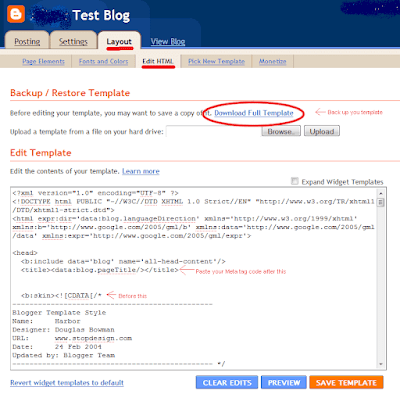
  • Goto: Dashboard>>Design>>Edit HTML
  • Then click 'Download Template' that way you have a copy of your blog template if you mess up
  • Now Find '<title><data:blog.pageTitle/><title>' see diagram for details
  • Then Highlight that code and copy and paste this code over it


<b:if cond='data:blog.pageType == &quot;index&quot;'>
<title><data:blog.title/></title>
<b:else/>
<title><data:blog.pageName/> | <data:blog.title/></title>
</b:if>


  • Click 'Save Template' and your done! It's That simple!
Blogger Template Diagram:


Photobucket


If you have any questions or problems leave a comment and let me know i'll help you, Happy Blogging :-)!

*If you can't read the diagram click it to enlarge the picture.

  • Digg
  • Del.icio.us
  • StumbleUpon
  • Reddit
  • RSS

Blogger on Your Cellphone: How to Make Your Blog 3G Phone Friendly

Blogger on Your Cellphone
Now that 3G has gotten so popular more people are using their cellphones to access the internet so lets get your blog cellphone ready! Here's how....


  1. Goto Dashboard>>Design>>Edit Html
  2. Click Download Template so that if you make a mistake you can just reapply your template the way it was before.
  3. Look for this in your code '<b:include data='blog' name='all-head-content'/>' FYI: It's at the very top of your template code.
  4. Now just below that paste this code...

<meta content='IE=EmulateIE7' http-equiv='X-UA-Compatible'/>
<b:if cond='data:blog.isMobile'>
<meta content='width=device-width, initial-scale=1.0, user-scalable=0' name='viewport'/>
<b:else/>
<meta content='width=1100' name='viewport'/>
</b:if>
Now Click Save! That's It.

  • Digg
  • Del.icio.us
  • StumbleUpon
  • Reddit
  • RSS

How to add a Twitter share button to your blog

A Twitter Button gives you more exposer
Want a Twitter share button on your blog...well here's how.

  • Go to your Dashboard>>Design>>Edit HTML
  • Then check the Expand Widget Template box and start searching your code for this '<div class='post-header-line-1/>' or '<data:post.body/>' and paste your code below it with no spaces
  • Now don't save it yet! 1st you have to change ' your_twitter_username' and replace it with your twitter username while keeping the underscores. 
  • Once you've added your twitter username you can click Save Template. 


This code will post the retweet button on the upper left corner of your blog posts


<div style="float:left;padding:4px;">
<script type="text/javascript">
tweetmeme_style = 'compact';
tweetmeme_url = '<data:post.url/>';
tweetmeme_source = 'your_twitter_user_name';
</script>
<script type="text/javascript" src="http://tweetmeme.com/i/scripts/button.js"></script>
</div>


This code will post the retweet button on the upper right corner of your blog posts


<div style="float:right;padding:4px;">
<script type="text/javascript">
tweetmeme_style = 'compact';
tweetmeme_url = '<data:post.url/>';
tweetmeme_source = 'your_twitter_user_name';
</script>
<script type="text/javascript" src="http://tweetmeme.com/i/scripts/button.js"></script>
</div>

  • Digg
  • Del.icio.us
  • StumbleUpon
  • Reddit
  • RSS

How to create and place your OWN Navbar in your Blogger Code!

Scroll down the page then look at the top of the screen...notice anything?Yeah that's My Very Own Toolbar! Cool right? So I bet you want one well here's how to get yours...


  • Goto: Apture.com 
  • Then, click the Get Started button and start designing Your own toolbar complete with Your own logo design or you can just type in your blog title.
  • You can also chose the color of your new toolbar. Then you go to your Blogger Dashboard>>Design>>Edit HTML
  • Now that your there start from the bottom of your code and work your way up as you scan for this '</body>' in your HTML code
  • Once you find '</body>' place the code you got from Apture right above that with no spaces in between, and click Save Template.
  • Don't forget to tweet this trick or look follow me on Twitter
 

  • Digg
  • Del.icio.us
  • StumbleUpon
  • Reddit
  • RSS

Add a Cool Rainbow Effect to all your links!

  • Goto your Dashboard>> Design>> Edit HTML
  • Click Download Full Template so you can click Clear Edits if you mess up with no worry about damage to your blog code
  • Then look for this </head> and right before this paste the code below (FYI: If you search your code from the bottom up you'll find it much faster)
  • Then click Save Template and your Done! Now when someone hovers over one of your links it turn rainbow colors!
  • The part of the code that's highlighted dark blue (var rate=20;) is how fast your links will change from one color to another you can edit the this But The Number Only!
  • Don't forget to share this blog with your friends!


<script type='text/javascript'>

 //<![CDATA[

 var rate = 20;

 if (document.getElementById)
  window.onerror=new Function("return true")

 var objActive;  // The object which event occured in
  var act = 0;    // Flag during the action
  var elmH = 0;   // Hue
  var elmS = 128; // Saturation
  var elmV = 255; // Value
  var clrOrg;     // A color before the change
  var TimerID;    // Timer ID

 if (document.all) {
  document.onmouseover = doRainbowAnchor;
  document.onmouseout = stopRainbowAnchor;
  }
  else if (document.getElementById) {
  document.captureEvents(Event.MOUSEOVER | Event.MOUSEOUT);
  document.onmouseover = Mozilla_doRainbowAnchor;
  document.onmouseout = Mozilla_stopRainbowAnchor;
  }

 function doRainbow(obj)
  {
  if (act == 0) {
  act = 1;
  if (obj)
  objActive = obj;
  else
  objActive = event.srcElement;
  clrOrg = objActive.style.color;
  TimerID = setInterval("ChangeColor()",100);
  }
  }


 function stopRainbow()
  {
  if (act) {
  objActive.style.color = clrOrg;
  clearInterval(TimerID);
  act = 0;
  }
  }


 function doRainbowAnchor()
  {
  if (act == 0) {
  var obj = event.srcElement;
  while (obj.tagName != 'A' && obj.tagName != 'BODY') {
  obj = obj.parentElement;
  if (obj.tagName == 'A' || obj.tagName == 'BODY')
  break;
  }

 if (obj.tagName == 'A' && obj.href != '') {
  objActive = obj;
  act = 1;
  clrOrg = objActive.style.color;
  TimerID = setInterval("ChangeColor()",100);
  }
  }
  }


 function stopRainbowAnchor()
  {
  if (act) {
  if (objActive.tagName == 'A') {
  objActive.style.color = clrOrg;
  clearInterval(TimerID);
  act = 0;
  }
  }
  }


 function Mozilla_doRainbowAnchor(e)
  {
  if (act == 0) {
  obj = e.target;
  while (obj.nodeName != 'A' && obj.nodeName != 'BODY') {
  obj = obj.parentNode;
  if (obj.nodeName == 'A' || obj.nodeName == 'BODY')
  break;
  }

 if (obj.nodeName == 'A' && obj.href != '') {
  objActive = obj;
  act = 1;
  clrOrg = obj.style.color;
  TimerID = setInterval("ChangeColor()",100);
  }
  }
  }


 function Mozilla_stopRainbowAnchor(e)
  {
  if (act) {
  if (objActive.nodeName == 'A') {
  objActive.style.color = clrOrg;
  clearInterval(TimerID);
  act = 0;
  }
  }
  }


 function ChangeColor()
  {
  objActive.style.color = makeColor();
  }


 function makeColor()
  {
  // Don't you think Color Gamut to look like Rainbow?

 // HSVtoRGB
  if (elmS == 0) {
  elmR = elmV;    elmG = elmV;    elmB = elmV;
  }
  else {
  t1 = elmV;
  t2 = (255 - elmS) * elmV / 255;
  t3 = elmH % 60;
  t3 = (t1 - t2) * t3 / 60;

 if (elmH < 60) {
  elmR = t1;  elmB = t2;  elmG = t2 + t3;
  }
  else if (elmH < 120) {
  elmG = t1;  elmB = t2;  elmR = t1 - t3;
  }
  else if (elmH < 180) {
  elmG = t1;  elmR = t2;  elmB = t2 + t3;
  }
  else if (elmH < 240) {
  elmB = t1;  elmR = t2;  elmG = t1 - t3;
  }
  else if (elmH < 300) {
  elmB = t1;  elmG = t2;  elmR = t2 + t3;
  }
  else if (elmH < 360) {
  elmR = t1;  elmG = t2;  elmB = t1 - t3;
  }
  else {
  elmR = 0;   elmG = 0;   elmB = 0;
  }
  }

 elmR = Math.floor(elmR).toString(16);
  elmG = Math.floor(elmG).toString(16);
  elmB = Math.floor(elmB).toString(16);
  if (elmR.length == 1)    elmR = "0" + elmR;
  if (elmG.length == 1)    elmG = "0" + elmG;
  if (elmB.length == 1)    elmB = "0" + elmB;

 elmH = elmH + rate;
  if (elmH >= 360)
  elmH = 0;

 return '#' + elmR + elmG + elmB;
  }

 //]]>

 </script>

  • Digg
  • Del.icio.us
  • StumbleUpon
  • Reddit
  • RSS

Live Footage of the BP Oil Spill!

Well it's been 85 days since BP screwed up the ocean after an Offshore Oil Drilling Expedition went horribly wrong! Since then BP Global has single-handedly put hundreds if not thousands of people out of work in the Gulf of Mexico and has deterred any if not all beach goers/tourists who were dreaming about soaking up some sun rays after this harsh 2009-2010 winter was finally over.


If any of you are interested here is live footage of the efforts made on BP's part to replace the Oil Containment Cap that they broke along with a counter clock on how many gallons of oil has spilled into the Gulf and how many days it's been since the whole thing started.


p.s - I wrote an article on Offshore Oil Drilling Pros and Cons way before it started Click Here to check it out.
p.p.s - I will continue to update this particular post periodically so bookmark this page, tweet this post, or send a shout out with the facebook button or any of the social netowork buttons. It does doesn't matter how just stay in touch with the TTR Web Matrix for updates!

  • Digg
  • Del.icio.us
  • StumbleUpon
  • Reddit
  • RSS

How to Link Your Social Network With Your Blog Posts/Website Updates Automatically

First Click Here, then sign up with them, after that follow the steps...


  1. Give Your Feed a Name. It could be the name of your blog, website or a keyword that best describes your content.
  2. Cut and Paste Your Blog/Website RSS Feed URL. If your using blogger than just go to your homepage then click the 'Post' button under the 'Subscription Gadget' it should open a new page, then copy and paste the URL from that page to the RSS Feed URL box on the sign up form. If your a member of Feedburner then enter that URL into the box and void what I said before.
  3. To authenticate your feed with the social network you chose click the giant blue button that says Authenticate, then using your own login information login in and grant the application access to post.
  4. Your Done! That's it and now every time you post on your blog or update your website it will automatically update your social networking page!  

  • Digg
  • Del.icio.us
  • StumbleUpon
  • Reddit
  • RSS

Better Video Uploading, Sharing, and Downloading for Free!

With the economy the way it is today, most of the Google searches are for the cheaper or even Free alternative websites that offer a better deal than retail but are still safe to use. So since I said I would bring you the latest and greatest deals to stretch your endangered Greenbacks I found a site that is legit, has no spyware, and offers Free video downloads for 30 days! Then it's just $4.99 a month after that, No gimmicks, Click Here!
Still skeptical?.. Well I thought you might be so I put together a website to better explain what this free video site is, how to use it, and what ways there are to take a few shortcuts when downloading movies, videos, tv shows, music videos, etc.. That website is called VideoRiddalin you'll be able to learn all you wanna know and then some.

So swing by check it out and explore the website I made for all you savvy shoppers out there looking to save some Greenbacks.


xxxxx
xxxxx
x
x
x


                              Click the Chart Above for More Details :D

  • Digg
  • Del.icio.us
  • StumbleUpon
  • Reddit
  • RSS

How to Add a Facebook Share Button to your Blog Posts

Click Here then goto Blogger Dashboard>> Design>> Edit HTML 
Then...

  1. Save Your Template by clicking Download Full Template
  2. Check the Expand Widget Template box
  3. Search your template code for this (< div class='post-header-line-1'/>) or ()
  4. Paste the button code you got from Here directly under the code snippets in step 3
  5. Click Save and your done :)
*Note: Be sure to line up the beginning of the button code(< a name=) with the beginning of the code snippets talked about in step 3.

  • Digg
  • Del.icio.us
  • StumbleUpon
  • Reddit
  • RSS

Effective Article Marketing

When your marketing through your articles, it's a Million times better to write good quality articles rather than to churn out your everyday crap-of-the-meal mass produced junk, but we'll just call them junk articles from now on. You don't have to be an award winning writer to put out a great article. What makes a great article: 

  • Simplicity, don't make it too complicated and remember synonyms can serve as a great replacement for large, difficult to pronounce, or rarely used words.
  • Relate, your experiences in the article, if you have none be honest about that while at the same time encouraging others to share their experiences with similar services and products to what your offering then highlight the pros and cons of both in you favor, this will offset bad press due to lack of experience with a particular service or product and shows you're open to every one's thoughts and/or concerns.
  • Spelling and Grammar, is a big one. Who will recommend a product or service that's being marketed in an article filled with misspelled words, poor punctuation, or Internet jargon...no one comes to mind I thought not. People are less focused on spelling and grammar when it's on a personal website or some other platform that's not meant specifically to attract their wallets, but when it  comes to Article Marketing it's shape up or ship out. So try running your article through a spelling and grammar check program before publishing then reread it yourself just to be sure.
  • Prove it, site your sources for your findings in your article geared towards getting people to open not only their minds but their wallets. If you don't have any specific sources that readers can go check out themselves then detail what research you did to come to the conclusion and basic point of your article this well win you some brownie points with your readers.
Now that we've gotten those Article Writing basics out of the way lets move on to some Article Marketing Do's and Don'ts:

Do write articles that provide solid information that shows how your product or service can be helpful to the needs of your readers/potential customers.

Don't boast about your company or you, save that for the media(or press releases)simply highlight and inform others about how your products and/or services can be of help or service to them.

Do select article topics that would allow you to some shed light on the things unknown or that simplify the complicated.

Don't write about topics that are too broad in range try to narrow down the topic to specifics. Lets say you right an article on Marketing Strategy, you wouldn't name the article 'Marketing Strategy' that's too broad and because of that it would probably get overlooked or ignored by readers because they aren't sure if your article is what they're looking for and since there are some many article just like your on the Internet they wouldn't take the time to read it, for fear of it being disappointing and a waste of time.

Do learn what makes a good headline. A lot of effective headlines include numbers, provide content specifics, and power words(great key words).
you want

Don't take headlines or article tags for granted you NEED them if you want to not only want to get your article read but found through search engines, being found through a search engine translates to free organic traffic.

I hope I've helped you with your venture into effective article marketing and if I have I'd really like to know so leave a comment on how this post has helped you in some way. Best Wishes :-)

  • Digg
  • Del.icio.us
  • StumbleUpon
  • Reddit
  • RSS

The World Wide Rave

What is a World Wide Rave?

No, it's not a massive rave party that's happening at the same time all around the world but just in different places. WWR is when a mass amount of people around the globe can't stop talking about you, your company, and your products. And when online buz drives buyers, bloggers, and fans to your site simply because they want to be there.

How do you achieve World Wide Rave Status?

Those of you who are Star Wars junkies should recognize this next quote "You must unlearn what you have learned." this phrased was quoted by Yoda in Star Wars. So how do you "unlearn" things we here are a few pointers:

  1. Unlearn the use of jargon(or slang) about your products or services, instead try to get rig to the needs and/or problems of your buyer persona's(identity).
  2. Unlearn spin(invented stories or lies). Realize that people not only crave but applaud and respect authenticity along with transparency. 
  3. Unlearn interrupting people with messages(aka:bothersome pop ups). Go the opposite direction and just publish the content that they want to read.
  4. Unlearn being egotistical(self-interested) forcing others to adapt  your terms. Create online content geared towards addressing buyer needs as well.
  5. Unlearn the assumption(hypothesis)that charging for access is a plus, because that isn't always the case. If you create something that becomes popular enough to rank WWR status then don't put the price tag on the access to your content put it on the product or service it self and then let the millions of people connected to the Internet tell & sell your story for you.
Even though this may sound a wee-bit overbearing right now just try to take it one step at a time an see how far it gets you. Don't forget that you have my happiest thoughts and best wishes, Thank You for reading come back soon :-)

  • Digg
  • Del.icio.us
  • StumbleUpon
  • Reddit
  • RSS

How to use a Reverse Search Engine Tool

Guess what you guys I found a free Reverse Search Engine Tool so now you can find the best keywords for you site!

For those who don't know what a Reverse Search Engine Tool is let me explain:

It's a tool that allows you to type in any key word or phrase and it gives you a whole list of relevant keywords and phrases to the word or phrase you typed plus how many times that word was searched in in the last say.. a month or a year and then you take the most searched key words and phrases and insert them into your Meta Tags. Then after that, all you do is sit back and watch the search engines fight it out gladiator style to index your site!

  • Digg
  • Del.icio.us
  • StumbleUpon
  • Reddit
  • RSS

Whaling is becoming an even bigger problem than before!

In a stunning instance of what can only be called collective cognitive dissonance, a small working group of the International Whaling Commission has just proposed we reinstate commercial whaling in order to save the whales.


Make no mistake: This proposal has nothing to do with saving whales, but is instead all about protecting the whaling industries of just a few obstinate countries who insist on destroying these amazing creatures. This proposal is the most serious threat to the moratorium on commercial whaling that we’ve seen since Greenpeace fought for and won the moratorium in the 80s.


Greenpeace activists witness the killing of whales in the Southern Ocean by the Yushin Maru and the Kyo Maru No.1 ships of the Japanese whaling fleet. © Greenpeace / Jeremy Sutton-Hibbert


While some US officials have been insisting that they are not supporting the proposal, we are very concerned about reports that the U.S. IWC Commissioner is not only supporting it but in fact pushing other countries to support it as well. The US position will be clarified at a meeting of the International Whaling Commission in St. Petersburg, FL next Tuesday and Wednesday.


Greenpeace vehemently opposes the proposal because:


  • It would allow whaling to take place in the Southern Ocean whale sanctuary. Not only would the killing of whales there continue, it would be legitimized.
  • By legitimizing all whaling, the proposal would secure the future of whaling instead of seeking to phase it out. With a single stroke, this proposal would reverse nearly three decades of progress in protecting endangered whale species.
  • It will set interim quotas – the number of whales each country is allowed to catch – based on political need, not scientific evidence. Nothing could be more disastrous to fragile whale populations than caving to political pressure rather than listening to scientists about the best way to protect healthy whale populations.
  • Adding insult to injury, the proposal would pass the costs of regulating whaling on to all members of the IWC, meaning that the taxpayers of even anti-whaling countries will be forced to support whaling operations.
GreenPeace is aiming to kill this atrocious, unscientific proposal before it even gets voted on, which will be at the IWC’s annual meeting in June. They’ll need your aid and support if we’re to achieve that goal, though.


Click Here to see the Full Proposal
 
Click Here to sign the Petition Against this propospal
 
This is a repost, to see the original article Click Here

  • Digg
  • Del.icio.us
  • StumbleUpon
  • Reddit
  • RSS

Stop the Madness!

Ok, So yesterday I was at Meijer with my sister and we saw the weirdest most disgusting dessert ever! A PRUNE PACZKI! (PawNch-kee) Why on planet earth would anyone want to eat a prune let alone a prune paczki. I mean that's just sick. So I ask all of you what is more nauseating to think about Prune Whip, Prune filled Paczkies, or some other 3rd Prune dessert?

  • Digg
  • Del.icio.us
  • StumbleUpon
  • Reddit
  • RSS

How to Customize Your Blogger Template: With a Meta Tag Generator

If you would like to nearly triple your web traffic in 48hours then listen up. I recommend using a Meta tag generator, you could write your own Meta tags but 'XHTML' is so touchy chances are you'll keep getting an error message,


  • Fill out the Meta tag form. Don't worry about the login/sign-up at the top of the form it isn't necessary.

Once you fill out the form for your Meta tags and click the Create Meta tags button all that's left to do is copy the code you get by highlighting it then right clicking your mouse then select copy or you could press "ctrl" then press "c" (to copy) and press "ctrl" then press "v"(to paste)


  • Net open the 'Layout' tab in your blogger account then go to the 'Edit HTML' sub tab but just to be on the safe side back up your template first by clicking the Download Full Template link at the top of the page once you open the 'Edit HTML' sub tab.
  • Then paste your Meta tag code:
  • Once You've created and inserted your own Meta tags successfully click the button below to sign up with a Webcrawler/Meta tag Search Engine and then go to Bravenet to get free web tools/widgets like a free guestbook, free feedback forms, a search box for your web page, and a whole lot more widgets and flash gadgets that will make your website or blog more appealing and user friendly, it's all FREE and there is no trial time limits :)
                                                        

Search Engine Optimization and SEO Tools
Remember that this is all free of charge to you but telling your friends or blogging about this post then back linking to it would be greatly appreciated.

FYI: If you don't see a thank you page after submitting your site to the above search engine then you should redo it because that means it was not submitted. Thank You!:)

  • Digg
  • Del.icio.us
  • StumbleUpon
  • Reddit
  • RSS

How to create a facebook application

Coming soon facebook is having some problem with their application editor it won't allow me to save anything to my app.

News Update on this...I have tried to make a facebook app a few more times but if your a regular on facebook then you know about all of their many glitches so the wait for this post continues, sorry.

  • Digg
  • Del.icio.us
  • StumbleUpon
  • Reddit
  • RSS

Offshore oil drilling is it a Good thing or Bad thing???


free glitter text and family website at FamilyLobby.com


1. True or False? - The U.S. burns 24% of the world’s oil but only has 3% of the world’s oil reserves…..TRUE    
     But is their really any correlation (or connection) between increased oil drilling and lower gas prices!? The number of drilling permits did increase 361% from 1999-07 but still that didn’t stop gas prices from more than doubling in less than a decade!2. So will more oil drilling result in lower gas prices for the U.S.? I think not. WHY? Cause crude oil prices are set by the Global Oil Market and that means that all of the oil produced around the world is sold at the same price -Translation for gas suppliers buy high sell higher- and U.S. citizens wouldn’t get a mark down on gas prices just because we are drilling on U.S. soil.
3. Did you know? - That the U.S. requires all automobiles to achieve 35 mpg by the year 2020 we will then be saving 1 MILLION barrels of oil per day!!!


                             GlitterKiss.com - Custom Glitter Graphics Generators and more..
Don't Forget to Leave a Comment About This
                             Post!

  • Digg
  • Del.icio.us
  • StumbleUpon
  • Reddit
  • RSS

How to increase virtual memory of your computer.

How to increase Virtual Memory?


In Windows XP


1.Click Start, and then click Control Panel.


2.Click Performance and Maintenance, and then click System.


3.On the Advanced tab, under Performance, click Settings.


4.On the Advanced tab, under Virtual memory, click Change.


5.Under Drive [Volume Label], click the drive that contains the paging file that you want to change.


6.Under Paging file size for selected drive, click to Custom size check box. You can enter the amount of memory you would like to reserve for Virtual memory by entering the initial and maximum size.


7.Click Set


When you are prompted to restart the computer, click Yes.


Special Note: You should choose the same amount for the initial size and maximum size. This will Stop your CPU from constantly changing the paging file.


HOT TIP: To stop your CPU from constantly changing the paging file, set the initial and maximum size to the same value. For example, 500 and 500. The value should be at least 1.5 times more than your physical RAM. If your computer has 512MB of RAM increase the virtual memory paging file to 1.5*512= 768


In Vista


1. Click Start button Picture of the Start button


2. Click Control Panel


3. Choose System and Maintenance and then click System.


4. In the left pane, click Advanced system settings.


5.On the Advanced tab, under Performance, click Settings.


6. Click the Advanced tab, and then, under Virtual memory, choose Change.


7. Click Custom to change the Initial size (MB) and Maximum size. See the hot tip above.


  • Digg
  • Del.icio.us
  • StumbleUpon
  • Reddit
  • RSS

@Taste the Rainbows we DO care!Question is DO YOU?

Hay everyone this one is coming straight from yours truly "Moneybags", I just thought I would let you know my #1 Goal when I started this blog it was because I wanted to spread the word about topics & big events that may sometimes, even though very important, go over looked or don't get enough exposure I don't bring you all this really good and informative news,research,and my humble opinion just to take up space, I do it because I really DO care! But the now the ball is in YOUR court, Do YOU really care?! Cause I know you all have opinions too so SPEAK UP YOU GUYS! Get involved somehow, you could:

  • Join Our Army to stay updated
  • Leave a comment with your url on a post you really like
  • Have a topic or issue that you think should be shared with the world leave it as a comment on a post you think is relavent to your subject and that's it!(Note: Product advertisements will not be published.)

OH! If your wonderin why I keep saying "our" it's because I don't think of 'Taste the Rainbows' as just MY blog it's YOURS TOO!

Mucho Mucho Thanks in advance for taking out the the time to stop and Taste our assortment of Rainbows from all of us here @ 'Taste the Rainbows' THANK YOU!


Da Rules:I am putting these in place to preserve & maintain a healthy and friendly environment for everyone

  • No Blatten Profanity
  • No Offensive content
  • No Religious Denominations
  • No Flaming ( personal attack of one or more persons)
  • No Making false accusations about any site,organization,person,group of people,or fellow blogger (so have Prof cause this is not a gossip blog)


Penalties for violating these rules will be as follows

Deletion and non-publishing of the document containing violation. If there is a repeat in violating the rules that user will be blocked from commenting or e-mailing @ Taste the Rainbows and an immediate bulletin post will be published warning other bloggers who have join and/or linked with Taste the Rainbows.

  • Digg
  • Del.icio.us
  • StumbleUpon
  • Reddit
  • RSS

OH! NO! The Amazon Rainforest is in Danger!


The Brazilian Congress, influenced by the agribusiness sector, seeks to change the Forest Code in Brazil to open more of the Amazon rainforest to be cleared. Not only will this destroy forested areas in the Amazon no longer protected by the Forest Code, but the clearing and burning of these lands will release millions of tons of greenhouse gas emissions into the atmosphere—making the impacts of climate change much worse.


  • The proposals to weaken the Forest Code include:
    A 250% increase in the percentage of land a farmer is allowed to clearcut (from 20% to 50%)
  • Allowances for farmers to replant exotic tree species such as palm trees and eucalyptus in Legal Reserves that are intended to be native rainfores


The region has already lost almost 18% of the forest cover—an area larger than France—in the last 40 years. In theory, the change being discussed by the Brazilian Congress would immediately apply to 36% of the Amazon in the hands of the private sector.


If these changes to the Forest Code pass, they will stimulate deforestation, increased greenhouse gas emissions, land grabbing, and disputes over land rights in the Amazon. The Forest Code would legally allow for millions of acres of the Amazon to be deforested and then burned to further clear the land for grazing cattle or planting soy.


All this could happen under the protection of the law if we don't stop it. Please send the message below to the Brazilian Congress today. It's important they recognize that the world depends on the Amazon for our survival, and the world is watching Brazil. Please take a moment to sign the petition below that is being signed by people all around the world.


Say No To Brazilian Congress!


Tell KFC to put a lid on its destruction of the Amazon rainforest! SPEAK UP

  • Digg
  • Del.icio.us
  • StumbleUpon
  • Reddit
  • RSS